Classroom Teacher

Exploring Dragon Naturally Speaking and Classroom Technology

  • Dragon Naturally Speaking Reviews ▼
    • Nuance Dragon Home vs Professional 15 review
    • Dragon 15 Bad Review
    • Nuance Dragon NaturallySpeaking 13 Premium Review
  • Classroom Tech Ideas
    • Show 2 different screens:
      laptop vs projector / TV
    • Add arrows and notes onto a screenshot
  • 21st Century Learning Skills ▼
    • 6 Cs of Education
    • Goal Setting for Students:
      powerpoint, lesson, worksheet
  • About this site
    • Disclosure Policy
    • Privacy Policy

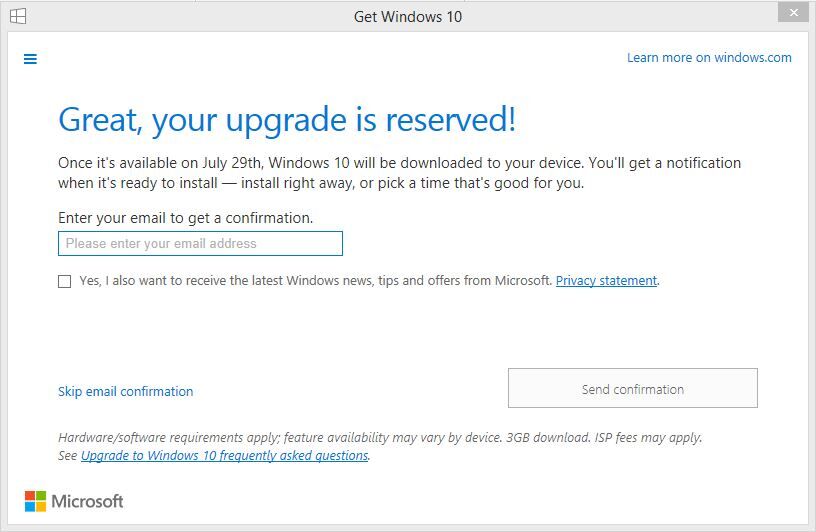
Windows 10 is coming and I just reserved my free upgrade.

June 5, 2015 - Leave a Comment

UPDATED: June 16, 2019. This post was originally written 4 years ago when I used Dragon, spoke naturally, and dictated this article. My computer transcribed what I wrote using speech-to-text software. Right now, I’m using Dragon NaturallySpeaking 13 with Windows 8.1 Pro. But, in a few months (on July 29, 2015) to be exact, my […]

This post was written using Nuance Dragon Naturally Speaking (Dragon NaturallySpeaking Premium 13)

When I wrote the first draft of this post, Nuance Dragon Voice Software was 99.1% accurate. Although I spoke naturally, the voice recognition software made 3 mistakes out of 342 words.

Dragon Naturally Speaking Home vs Professional 15 Review:

  • Nuance offers two versions of their voice software. Read this blog post comparing Dragon Professional vs Dragon Home 15.
  • UPDATE (Tue, Dec 10, 2019): By the way, I still use Dragon Professional 15 to blog and write things down – even though I type at 100+ WPM. The last post I dictated was this one about a free New Year’s Resolution writing activity.

Dragon NaturallySpeaking Summer Sale: Save $60 off Dragon NaturallySpeaking Premium

July 31, 2013 - Leave a Comment

This post has been edited and the information about the Difference between Dragon NaturallySpeaking Home and Premium editions has been moved here. I just got an email from Nuance, the people who make Dragon NaturallySpeaking voice recognition software, letting me know that they are having a summer sale. It’s a pretty good deal, so if […]

This post was written using Nuance Dragon Naturally Speaking (Dragon NaturallySpeaking 12.5 Premium)

When I wrote the first draft of this post, Nuance Dragon Voice Software was 99.3% accurate. Although I spoke naturally, the voice recognition software made 4 mistakes out of 613 words.

Dragon Naturally Speaking Home vs Professional 15 Review:

  • Nuance offers two versions of their voice software. Read this blog post comparing Dragon Professional vs Dragon Home 15.
  • UPDATE (Tue, Dec 10, 2019): By the way, I still use Dragon Professional 15 to blog and write things down – even though I type at 100+ WPM. The last post I dictated was this one about a free New Year’s Resolution writing activity.

Teaching Media Literacy using (legal) Hollywood Movie Clips in your class lesson

February 20, 2013 - Leave a Comment

Do you teach media literacy? Do you want to spice up your lesson with a short scene from a real Hollywood movie? A colleague of mine recently showed me the coolest website. MovieClips.com has posted online free and legal clips from Hollywood movies that you can share with your students and embed into your lessons. […]


Dragon Naturally Speaking Home vs Professional 15 Review:

  • Nuance offers two versions of their voice software. Read this blog post comparing Dragon Professional vs Dragon Home 15.
  • UPDATE (Tue, Dec 10, 2019): By the way, I still use Dragon Professional 15 to blog and write things down – even though I type at 100+ WPM. The last post I dictated was this one about a free New Year’s Resolution writing activity.

Sending classroom website email newsletters: Google Sites (FeedBurner) versus WordPress

September 3, 2012 - Leave a Comment

I had the opportunity to sit in on a Google Sites and Google apps for education workshop the other day as we gear up for the start of the new school year. There’s lots to like about a classroom website powered by Google sites: Your teacher website is hosted by Google which means, chances are, […]


Dragon Naturally Speaking Home vs Professional 15 Review:

  • Nuance offers two versions of their voice software. Read this blog post comparing Dragon Professional vs Dragon Home 15.
  • UPDATE (Tue, Dec 10, 2019): By the way, I still use Dragon Professional 15 to blog and write things down – even though I type at 100+ WPM. The last post I dictated was this one about a free New Year’s Resolution writing activity.

Download Dragon NaturallySpeaking Software (Dragon NaturallySpeaking 11.5)

January 15, 2012 - Leave a Comment

This post was written using Dragon NaturallySpeaking 11.5 premium wireless using Windows 7 64-bit. What is Dragon NaturallySpeaking? Compare the different versions of Dragon NaturallySpeaking before you download. A few people have been searching this blog on classroom technology for information about how to download Dragon NaturallySpeaking and so I thought I would put all […]


Dragon Naturally Speaking Home vs Professional 15 Review:

  • Nuance offers two versions of their voice software. Read this blog post comparing Dragon Professional vs Dragon Home 15.
  • UPDATE (Tue, Dec 10, 2019): By the way, I still use Dragon Professional 15 to blog and write things down – even though I type at 100+ WPM. The last post I dictated was this one about a free New Year’s Resolution writing activity.

I use Dragon Professional 15 (OFFICIAL WEBSITE) to write documents and dictate blog posts.

  • Comparing Nuance Dragon Home vs Professional 15
  • Dragon 15 Bad Review: PROBLEMS to know about before you buy
  • Nuance Dragon NaturallySpeaking 13 Premium vs Professional 15 review: A story about helping a friend using voice recognition software for the first time.
  • 10 things to know about Dragon Naturally Speaking Education Version BEFORE you buy
Use Dragon Speak Naturally: Side by side comparison of Nuance Dragon Home 15 vs Nuance Dragon Professional 15 showing multiple user profile option in start window

Dragon Naturally Speaking Review: Dragon Home 15 vs Dragon Professional Individual 15 (NEWEST VERSION)

Classroom Technology

Picture of a Windows laptop screen showing one thing and the projector screen showing a different screen

How to project computer to TV and show different display on laptop / projector / TV

How to Draw on a Screenshot: Quickly Add Arrows and Text on a Screenshot (Windows)

screenshot of iPad showing general and accessibility options to lock ipad to one app

How to lock your iPad screen so students can only use 1 specific app

Recent Comments

  • Grade 8 Teacher on Dragon Naturally Speaking Review: Dragon Home 15 vs Dragon Professional Individual 15 (NEWEST VERSION)
  • Grade 8 Teacher on Dragon Naturally Speaking Review: Dragon Home 15 vs Dragon Professional Individual 15 (NEWEST VERSION)
  • Grade 8 Teacher on Dragon Naturally Speaking Review: Dragon Home 15 vs Dragon Professional Individual 15 (NEWEST VERSION)
  • Clara Chen on Dragon Naturally Speaking Review: Dragon Home 15 vs Dragon Professional Individual 15 (NEWEST VERSION)
  • Ben on Dragon Naturally Speaking Review: Dragon Home 15 vs Dragon Professional Individual 15 (NEWEST VERSION)

Copyright © 2026 · ClassroomTeacher.ca uses Dragon Naturally Speaking · Log in